

Beyond the Teacher Toolbox: Practical Fixes for Every CTE Teacher
How to Streamline Your CTE Lab: 3 Simple Solutions
I truly believe that if a regular education teacher stepped into a CTE classroom on a random lab day, they would be baffled by the amount of controlled chaos that is happening. As CTE teachers we are required to juggle not just the content and curriculum but the mass amounts of supplies. Skill specific labs and real-life skills students are learning makes us basically a circus performer.
I don’t know about you but I tend to feel like a lot of the tips and tricks that are shared at professional development or even on social media just doesn’t hit the mark for a CTE classroom.
While CTE teachers are hugely creative individuals who can problem solve these issues, we wanted to compile some of our favorite tips that might help you solve one of your unique CTE problems.
I also will be the first to say, teachers really don’t need more tools in our teacher toolbox. In my district, if I log into our online teacher toolbox it has 22 tabs and each of those tabs has even more tech tools. We don’t need that much.
We need to find the tools that make our days run smoother. And sometimes those tools are low tech and sometimes high tech.
Every classroom is unique and every teacher has their own special sauce for classroom management. Remember to take the tips that you want to try and leave the rest. It doesn’t hurt our feelings if you only use one thing we share. If that is something that changes the way you are able to teach, hallelujah, heck yeah!
Now, let’s take some time to dive into how we can solve some unique problems in the CTE space and find some low tech and high tech upgrades
PROBLEM #1: Large Spaces, Small Voices
A lot of CTE spaces are the largest in the school. I mean could you imagine a welding shop in the size of an English classroom? It just wouldn’t work. But, these large spaces make it hard to communicate effectively to our students without damaging our vocal cords on the daily. We need some tools that make it easier to get our student’s attention and keep it so they know exactly what to do, when to do it and how to stay safe.
Low Tech Fix
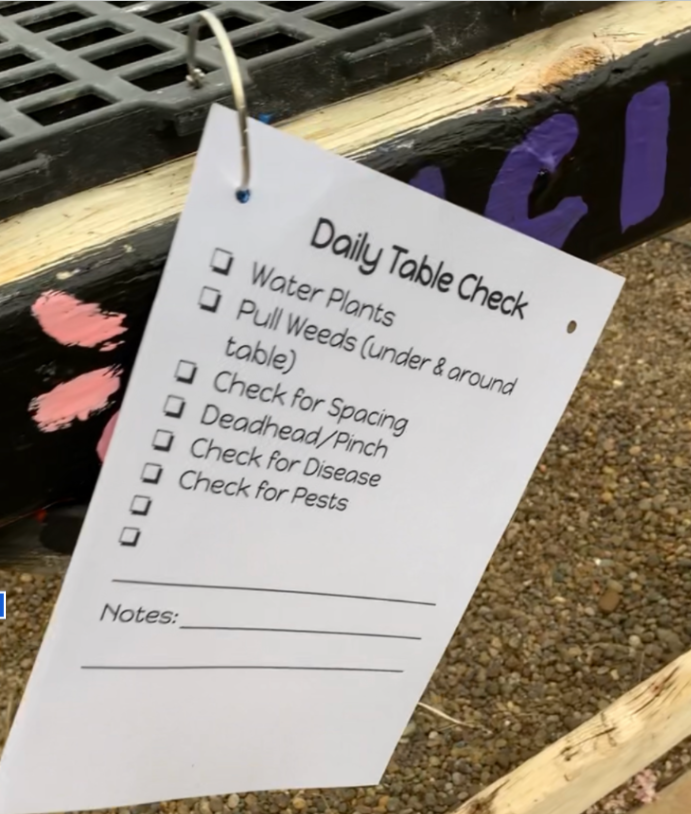
Utilize physical task boards and visual cue cards posted around the lab to clearly map out exit directions and daily expectations. By keeping routine instructions written down in high-traffic areas, you drastically cut down on the need to yell over machines. Here is an example from Cassidy’s greenhouse so her horticulture students know exactly what to do every time they are in the greenhouse.
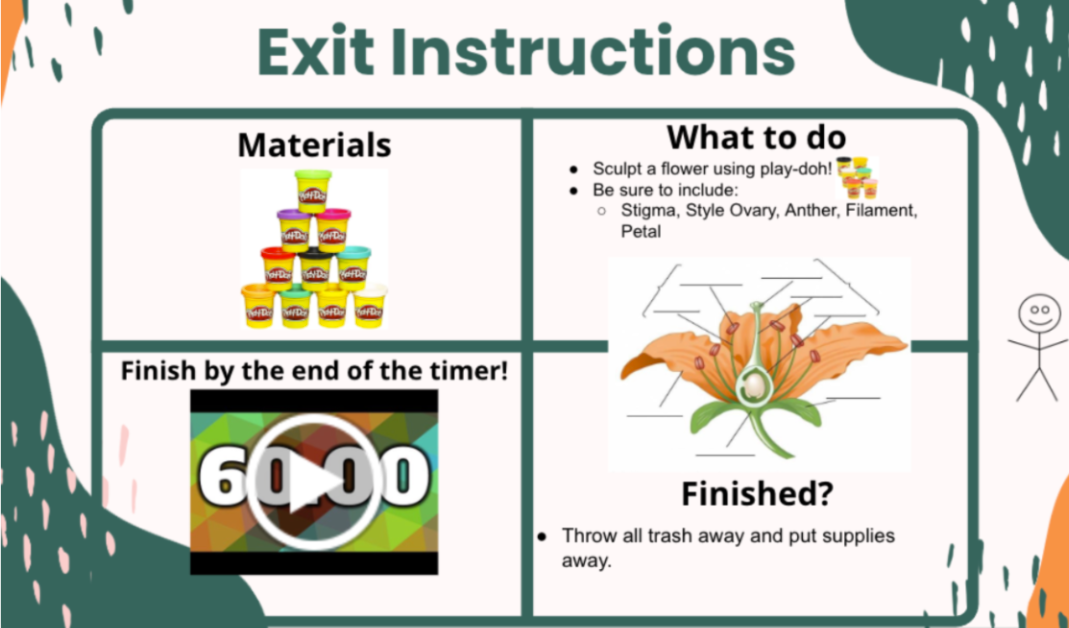
High-Tech Upgrade: Invest in a wearable voice amplifier headset (Sarah loves using this one daily) so you can speak at a normal volume while still reaching the back corners of the shop. You can also pair this with a central projector screen to display digital countdown timers, exit directions, and live visual noise meters (like Bouncy Balls). Below is a set of exit directions Laura used for her middle schoolers in the lab for modeling flower parts. If you have never made exit directions, check out this blog with more information.
Problem #2: Can Everyone See This?
Demonstrating intricate, hands-on skills becomes a major challenge when thirty students are all trying to crowd around a single workstation. The students in the back inevitably miss the subtle hand placements or safety nuances, leading to mistakes later on. If your students are constantly straining their necks or complaining that they can't see the demonstration, you need a better way to scale your view.
Low-Tech Fix: Use angled mirror tables suspended above your demonstration station (use your Perkins Funding or see if there is one available in your district before buying!) A free way to fix this is to break the class into rotating small-group demos while others work from printed photo guides. A past teaching partner did this in her Vet Science class. One station would be her demonstrating the new skill like suturing, and the other groups were cleaning the lab, working on notes or completing a project. This keeps the physical crowd small by you and ensures every student gets a clear, line-of-sight view of the technique.
High-Tech Upgrade: When you have time, record your demonstrations from a first-person perspective and post the videos directly to your LMS for easy student access. You can also print out QR code posters and tape them directly to the lab equipment, allowing students to instantly scan and watch a close-up tutorial right when they need it.
Problem #3: A Million Questions
When a lab gets moving, a teacher can quickly become the bottleneck as a line of students forms just to ask a quick question. I absolutely know you want to foster independence, but instead, you end up repeating the same troubleshooting steps twenty times in a single period. I know I can feel like a broken record on lab days if I am not careful. Finding a way to streamline these inquiries allows you to focus on critical safety interventions rather than basic logistics.
Low-Tech Fix: Implement an "Ask Three Before Me" rule. It is exactly what it sounds like, have students ask three classmates before they ask you! I recently saw the idea to designate a knowledgeable student to act as the official "Ask Siri" helper for the day on Instagram. I love the idea of elevating a student to a classroom leadership role to help lessen your load. You can also use a deli-style queue system where students grab a physical number and keep working at their desks until their number is called. This doesn’t have to be an actual deli system. In my class, I printed numbers on card stock, laminated them, punched holes and added a binder ring to them. They live on my whiteboard and students can grab when they need it. I use my voice amplifier and rally my inner robotic voice and say “now serving number 5” to find my next student.
High-Tech Upgrade: Set up a dedicated class discussion board or group chat on your LMS where students can crowd-source answers from one another in real time. You could also use a digital queue app like handraiseapp.com so students can virtually line up for help without leaving their workstations.
Want to bring these strategies to your school?
This is just a tiny sneak peek of what we cover in our signature professional development sessions!
If you want to help your CTE teachers tame the chaos and streamline their lab management, we would love to partner with you. Contact us today to see how we can help facilitate a custom workshop or presentation for your teacher group!